RECEIVE YOUR FREE HAIR CARE DIARY
VALENTYNBEAUTY
Soft hair in one week

By the way, how do I do it?
Step 1: Access the program page
When you enter the site, you will arrive at the homepage. In the menu, click on "AFROLOGIE" (see the image on the right). This will take you to the program description page.
Scroll down the page until you see a video. Just below it, you'll find two buttons:
-
Contact us
-
Join the AFROLOGIE program
Click on "Join the AFROLOGIE program" (see image).
Step 2: Navigate to registration
You are now on the program selection page. Locate "Programs" and click "Learn More" or "View Details" (as shown in the image). Then, scroll down and click "Join," which will trigger a login pop-up window.
You are a new customer, so select "Register" to create an account.
Are you already a customer? Click here to log in .


Step 3: Create your account
After selecting "Register", you will have two registration options:
✅ Sign up by email
❌ Do NOT use Google registration
Enter an email address that you can access and create a strong password. Keep your password in a safe place, as you will need it for future logins.


Step 4: Complete the purchase
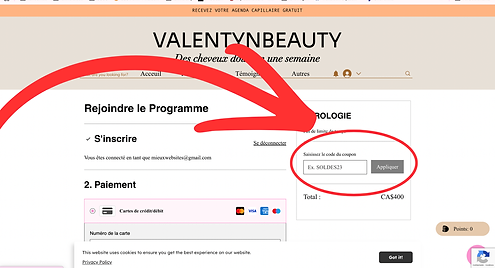
Once logged in, you will still be on the AFROLOGIE page, but you will now be logged in. Scroll down and click "Join" again to proceed to the payment page.
🚨 IMPORTANT: If there is a promotion, be sure to enter the promotional code as shown in the image. We will NOT issue a refund if a discount code has not been applied! 🚨
Choose your payment method:
-
PayPal
-
Credit/debit card
Complete the requested information and finish your payment.
Step 5: Access your program
Once your payment has been processed:
-
Refresh the page or close and reopen the website.
-
Hover over your profile picture in the upper right corner.
-
Click on "My programs" (as shown in the image).
-
Scroll down and locate the two tabs. Click on "Assets" (if it's not already clicked).
-
You will now see the AFROLOGIE program - you're there! 🎉
Now go ahead and make your hair shine! ✨